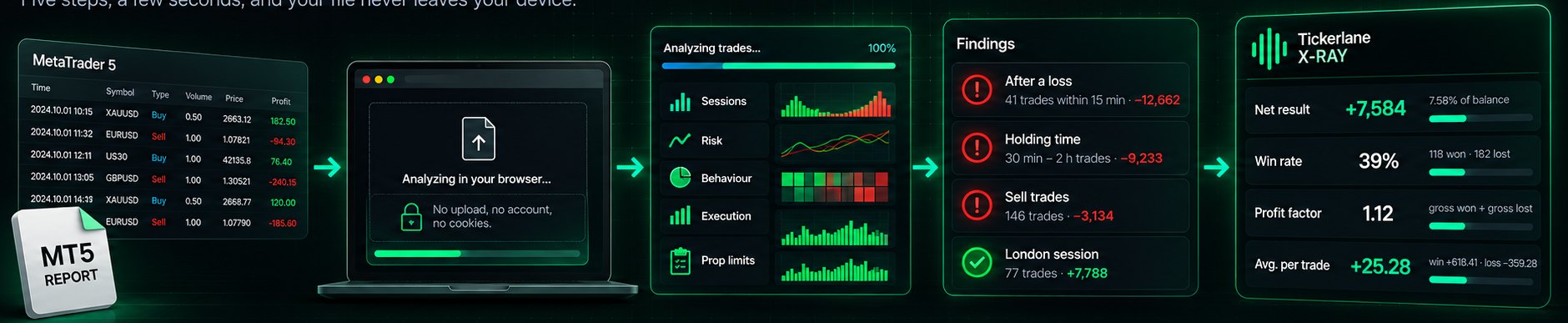
From MT5 report
to your X-Ray.
Five steps, a few seconds, and your file never leaves your device.
Export your report
The X-Ray reads the closed trades: open and close time, symbol, side, volume, prices, stop, commission, swap and result.
MetaTrader 5
- Open the Toolbox (Ctrl+T) and go to the History tab.
- Right-click inside the list and choose Report → HTML.
- Pick the period, save the file and drop it into the X-Ray.
MetaTrader 4
- Open the Terminal (Ctrl+T) and go to Account History.
- Right-click → All History, so every trade is listed.
- Right-click again → Save as Detailed Report, then drop the .htm file.
cTrader and others
- Open the history of closed positions.
- Export it as CSV.
- Drop the file: we recognise the usual column names (open/close time, symbol, direction, volume, prices, result).
Drop, read, see.
A real screen recording of the X-Ray: a MetaTrader report is dropped in, read in the browser, and the patterns that cost the most appear. Example on invented trades.
What happens to your report
It stays on your device
The report is read by your browser with JavaScript. It is never uploaded, stored or seen by anyone: close the page and it is gone.
No sign-up, no cookies
You don't create an account. We only count, anonymously, that a report was read (HTML or CSV), never its content.
Common questions
Does it work with prop-firm accounts?
Yes. Export the report from the MT4 or MT5 terminal of your challenge or funded account. The X-Ray also checks your worst day and your lowest point against the daily and max loss limits you set (5% and 10% by default).
Why do my session times look shifted?
MetaTrader shows times in the broker's server time. By default we assume UTC+2 in winter and UTC+3 in summer, which most MT4/MT5 brokers use. If yours is different, change it in Settings on the Analyze page.
What is "R"?
The result of a trade divided by the distance between entry and stop. −1 R means you lost exactly what your stop allowed; −1.4 R means the loss went 40% beyond it. The report keeps only the last stop of each position, so a stop moved to break-even is counted separately.
Is this investment advice?
No. The X-Ray describes what happened in your past trades. It gives no signals, makes no forecasts and does not tell you what to do.
Does an AI analyse my trades?
The numbers are always computed by code in your browser, so they are exact and your file stays private. In Pro, an AI explains those patterns in plain words and answers your questions; it receives only the summary numbers of your X-Ray, never your trades, and it describes what happened: no signals, no forecasts. Pro is in development.
What does it cost?
The free X-Ray costs nothing and needs no account: key numbers, result curve, the 3 biggest patterns, the discipline total, edge check and prop-limit verdict. The challenge post-mortem (the complete X-Ray of one report: every pattern, your rules one by one, the tables, stops and risk, PDF) will cost €12 one-time. Pro will cost €29 a month or €249 a year for the first 100 people who join the waitlist, a price kept as long as the subscription stays active; when the X-Ray Guard is live, €39 a month or €349 a year for everyone after them. The before-you-click check is free during the beta; later, 10 checks are free, then a pack of 50 for €19 that never expires, or unlimited checks in Pro. When payments open, each of them gets a personal link by email, valid for 14 days; one place per email address. Payments are not open yet: nothing is sold today.
Ready? Your report is one right-click away in MetaTrader.
Analyze my trades →